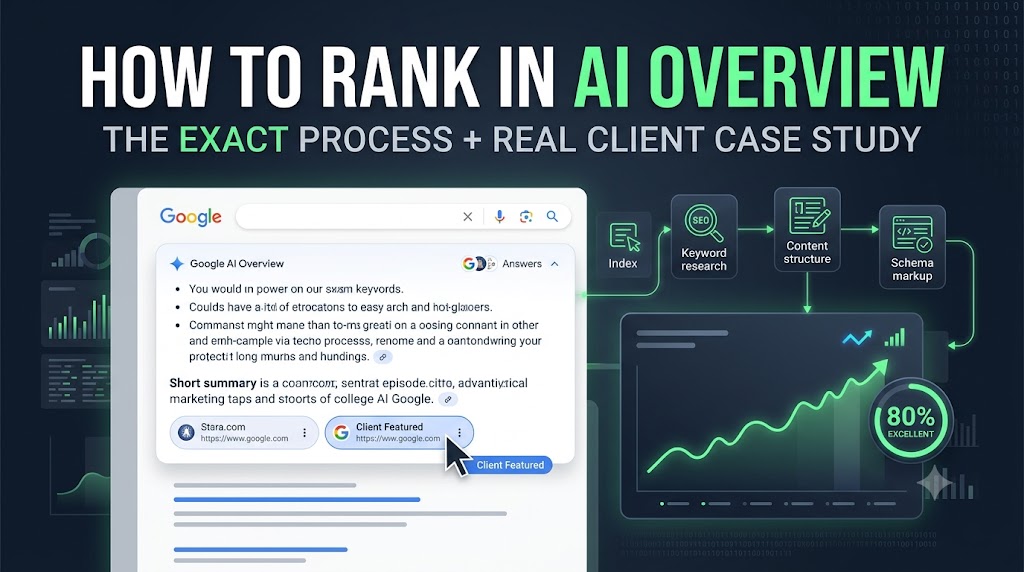
How to Rank in AI Overview: The Exact Process We Used to Get a Client Featured

How to Rank in AI Overview: The Exact Process We Used to Get a Client Featured

Introduction

Google’s AI Overview has changed how search results look. Instead of ten blue links, a chunk of the answer now sits right at the top of the page, written by Google’s AI and pulled from a handful of trusted sources. If your content isn’t one of those sources, you’re invisible, even if you’re ranking #1 organically below it.

A few months ago, one of our clients asked us to get their site featured in AI Overview for a competitive query in their industry. Instead of just telling you “do good SEO,” we wanted to show you exactly what that meant in practice: the actual keyword research screenshots, the actual content scorecard, the actual steps we took in order. This article does two things. It explains how AI Overview ranking actually works, and it’s a transparent look at our own process, including the bits we still need to fix, so you can see what “doing it properly” really looks like instead of just being told to do it.

If you take one thing away from this, take this: ranking in AI Overview isn’t a trick or a hack. It’s the same SEO basics you already know, keyword research, competitor analysis, content structure, schema markup, internal linking, fast indexing, just done with a bit more care than a normal blog post. Here’s the exact sequence we followed.

Step 1: Start With Proper Keyword Research

Before you write a single word, you need to know exactly which keyword (or group of keywords) you’re trying to rank for. This is the foundation everything else is built on, and skipping it is the most common reason AI Overview optimization attempts fail.

Pick any keyword research tool you’re comfortable with. SE Ranking, Ahrefs, SEMrush, or even the free Google Keyword Planner all work fine. The tool matters less than the process. Here’s what we actually did:

Started with one seed keyword related to the topic, “how to rank in AI overview.”

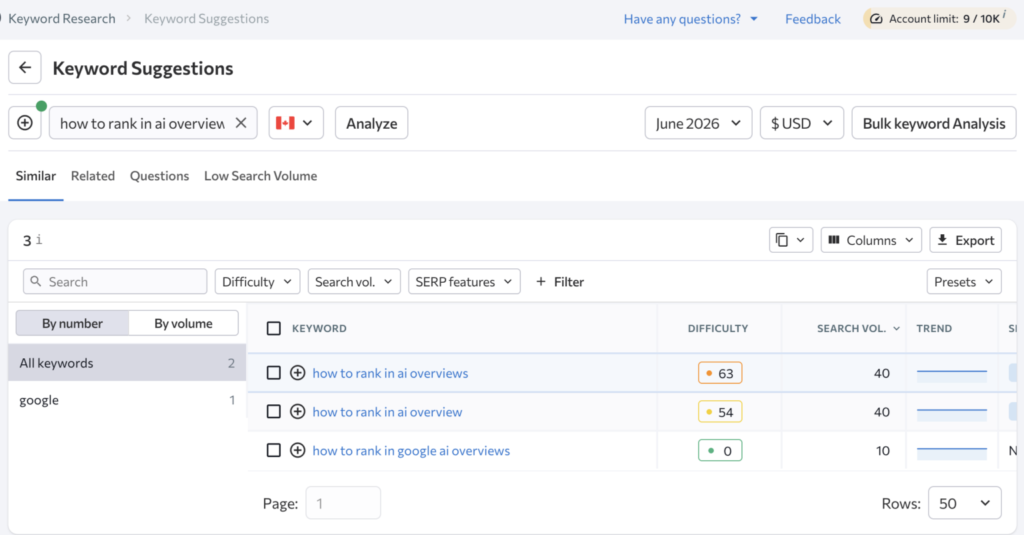
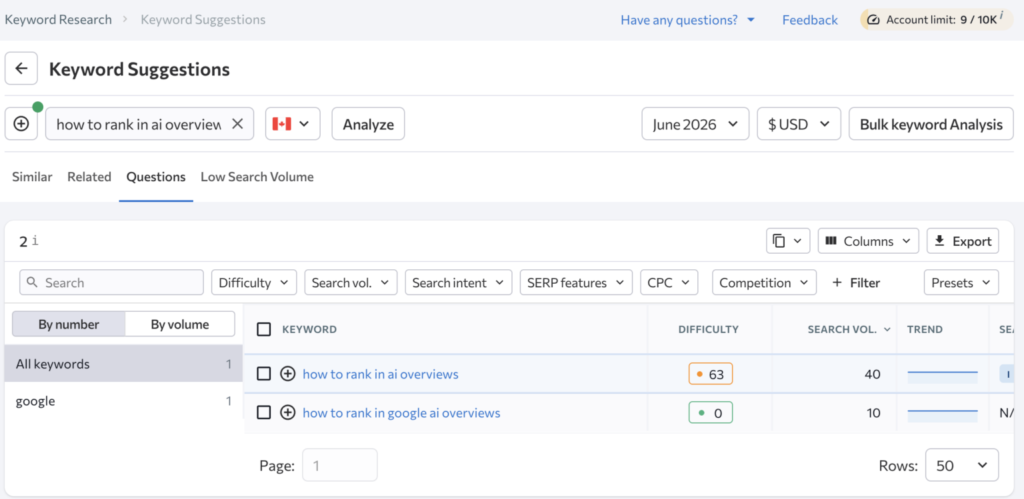
Pulled every related keyword variation the tool gave us, including close variants, plurals, and long-tail phrases, using the “Similar,” “Related,” and “Questions” tabs inside the keyword tool rather than just the main suggestion list. Don’t filter too early. You want the full list first.

Noted the search volume, keyword difficulty, and CPC for each one. This tells you which keywords are worth targeting and which ones are too competitive or too low volume to bother with.

Checked the SERP features column. If a keyword already triggers an AI Overview, Featured Snippet, or “People Also Ask” box, that’s a good sign Google considers it answerable in a single, structured piece of content, which is exactly the kind of keyword that’s worth this effort.

SE Ranking Similar tab comparing difficulty and volume for "how to rank in ai overviews," "how to rank in ai overview," and "how to rank in google ai overviews

SE Ranking Questions tab showing keyword difficulty and search volume for "how to rank in ai overviews" and "how to rank in google ai overviews"

These two views matter for different reasons. The “Questions” tab shows phrases people search as full questions, which line up closely with how AI Overview phrases its own answers. The “Similar” tab is where you catch near-duplicate phrasing, singular versus plural, “ai overview” versus “ai overviews,” that’s easy to miss if you only check one variant. Both are worth targeting in the same article rather than splitting them across separate pages, since they’re clearly the same search intent.

Don’t stop at five or ten keywords. Build out as big a list as you can at this stage. You can always trim it down later, but you can’t optimize for keywords you never found in the first place.

Step 2: Check Who’s Already Ranking (Competitor Keyword Gap)

Once you have your core list, the next move is to check who’s already ranking for those keywords, and grab their keyword gaps for yourself.

Here’s how:

  1. Take your top three to five keywords and search them in Google directly (or run them through your tool’s SERP analysis feature).
  2. Look at the pages ranking on page one, plus any pages already showing up in the AI Overview citation list or sitting at the top organic spot.
  3. Run those competing URLs back through your keyword tool to see what other keywords they’re picking up.

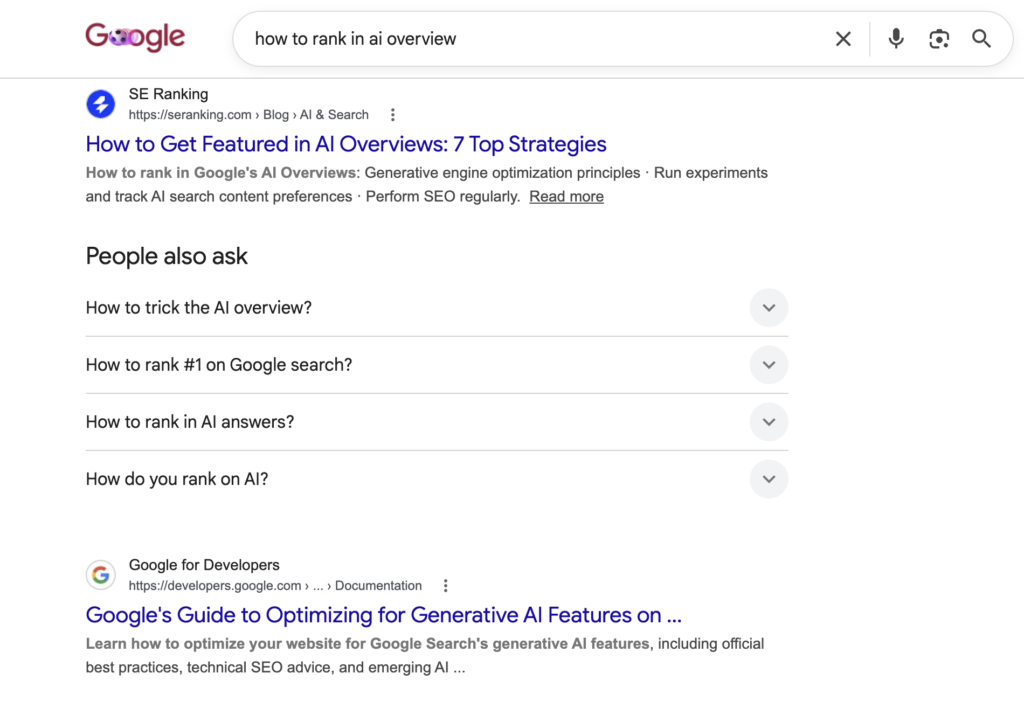
Google SERP for "how to rank in ai overview" with SE Ranking's blog post ranking first above the People Also Ask section

Worth noticing in that screenshot: the top result for this exact topic comes from a company that already works with SEO data all day. That’s not random. It’s a decent signal that for topics like this, Google trusts sources that show first-hand experience with the subject, which is part of why showing your own process and your own numbers (like we’re doing here) carries more weight than a generic rewrite of “what the experts say.”

This step almost always turns up keywords you wouldn’t have thought of on your own, phrases your competitors are already pulling traffic from. Add the useful ones to your master list, then map them into your content: primary keyword in the title and H1, secondary keywords spread across your H2s and H3s, and supporting phrases worked naturally into the body. Don’t force them in. Google’s systems are decent at spotting keyword stuffing, and it hurts your chances of getting cited.

Step 3: Mine “People Also Ask” and Related Questions

AI Overview is, at its core, a question-answering engine. So one of the best sources for content ideas is the questions people are actually typing into Google. When we searched our target keyword, the “People Also Ask” box brought up questions like:

How to trick the AI Overview?
How to rank #1 on Google search?
How to rank in AI answers?
How do you rank on AI?
How to get ranked in AI Overview?

These are the ones we built into this article because they’re directly relevant and reflect real search intent. Elsewhere in our broader keyword list, unrelated questions showed up too, things like “What is 40 tops in AI?” or “Is ChatGPT left or right leaning?” We left those out on purpose. They technically appear in related search data, but they’re not actually relevant to ranking in AI Overview, and cramming in irrelevant questions just to grab extra volume tends to backfire. It muddies what the page is actually about and makes it harder for Google’s AI to figure that out. Relevance beats reach every time.

Use the same filter on your own topics. Pull every “People Also Ask” question available, then keep only the ones a real reader searching your main keyword would actually want answered. A decent test: if I searched this exact keyword, would I expect this question to be answered on the page I land on? If not, leave it out, even if it’s got decent volume attached.

Step 4: Write the Content, Properly Optimized and Properly Structured

This is where most people rush and most articles fall flat. AI Overview doesn’t pull from content that’s hard to parse. It favors content that’s clearly structured, answers the question directly, and is easy for both humans and machines to scan. This is part of a broader practice called generative engine optimization, which is really just SEO adapted for how AI systems read and extract content.

A few things that aren’t optional:

  • One clear H1 that matches your primary keyword intent.
  • Logical H2s and H3s that break the article into scannable sections, each one answering a specific sub-question, not just there for looks.
  • Direct answers near the top of each section. Don’t bury the answer in paragraph four. Say it in the first sentence or two, then expand.
  • Short paragraphs. AI systems (and people) parse short, plain sentences far more easily than long, winding ones.
    Natural keyword placement based on the research from Steps 1 and 2, title, H1, a few H2s, and naturally through the body.

Think of every H2 as basically its own mini FAQ answer. AI Overview tends to pull the section that most cleanly and completely answers a query, so each section needs to work almost on its own. If someone only read that one paragraph, would they get a complete, accurate answer? If not, tighten it up.

Don’t Skip Internal Linking

Internal linking is one of the most underrated parts of this whole process, worth its own mention. When you publish this article, link out to other relevant pages on your own site, service pages, related blog posts, or supporting guides. This does two things: it helps Google understand how this content fits into your site’s wider topic, and it spreads ranking signals across your pages instead of leaving this one article to fend for itself. If you’ve got an existing page about SEO, keyword research, or content strategy on your own marketing site, link to it from here, and link back to this article from there once it’s live. As you publish more content in the same area, go back and tie older and newer articles together too. It’s not a one-time job at launch. It’s something to revisit every time you publish something new in the same space.

Add a FAQ Section and Schema Markup

Close out the article with a dedicated FAQ section using the questions you gathered in Step 3. Then add FAQ schema markup to that section. This gives Google a structured, machine-readable version of your Q&A content, which is exactly the format AI Overview likes pulling from.

On top of FAQ schema, add Article schema to the page as a whole. This tells search engines key details about the content, author, publish date, headline, and more, which helps build context and authority around the page.

Step 5: Publish, Then Get It Indexed Fast

Writing the content is only half the job. Once the blog is live:

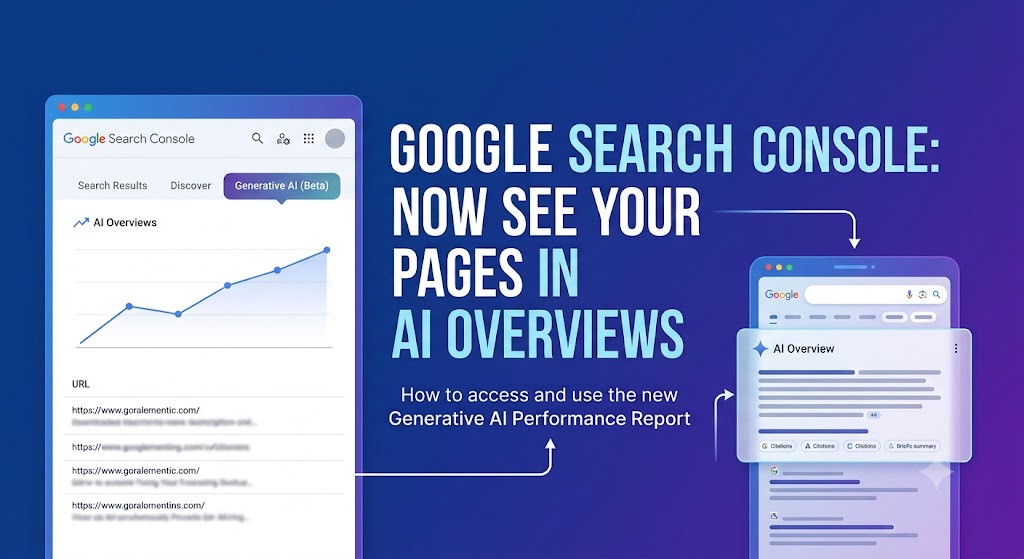
  1. Submit the URL directly in Google Search Console (GSC). Use the URL Inspection tool and request indexing.
  2. Submit (or resubmit) your sitemap in GSC so Google’s crawlers know the new page exists and can get to it efficiently.
  3. If it’s still not indexing after a few days, link to the new post from an existing page on your site that’s already indexed and gets crawled regularly. This passes a crawl signal through to the new page and speeds things up. Pick a page with decent existing traffic and authority, not just any random page. The stronger the linking page, the faster the signal travels.

This step matters more than people think. AI Overview can only cite pages Google has actually crawled, indexed, and understood. A great piece of content sitting unindexed for two weeks is invisible, no matter how well it’s written.

Step 6: Don’t Forget the “Small” On-Page Details

This is the part everyone forgets, and it quietly drags down a lot of otherwise solid content:

  • Meta title, include your focus keyword near the front.
  • Meta description, write it like an ad. It should make someone want to click.
  • Focused keywords, make sure your primary keyword shows up in the title, URL, and intro.
    Image alt text, every image needs descriptive, keyword-relevant alt text.
  • Image file names, this one gets missed all the time. Don’t upload an image as IMG_20394.jpg. Rename it to something descriptive like how-to-rank-in-ai-overview-process.jpg before uploading. Search engines read file names as a clue to what the image actually shows, and it takes five seconds, yet so many sites never bother.

Step 7: Run It Through a Content Checker Before You Call It Done

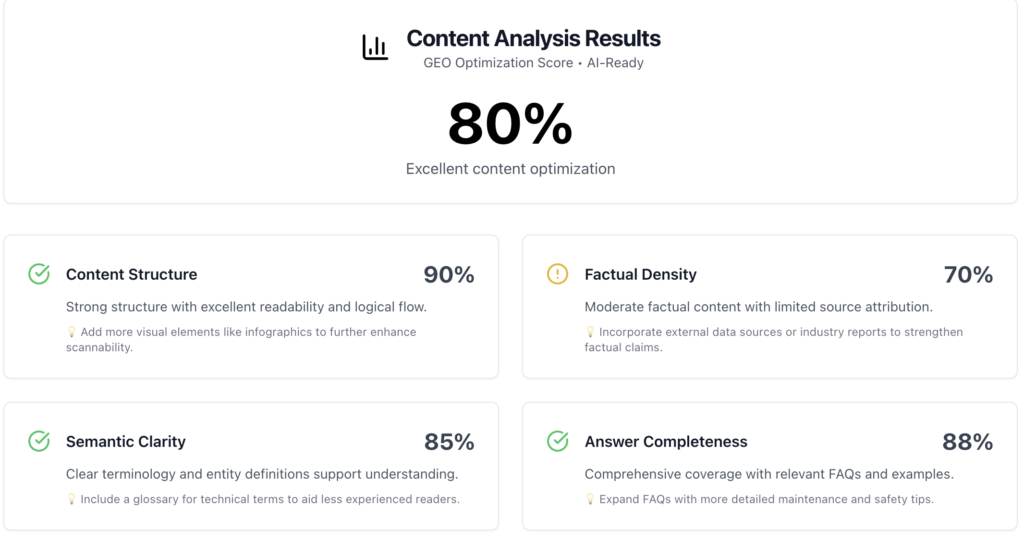
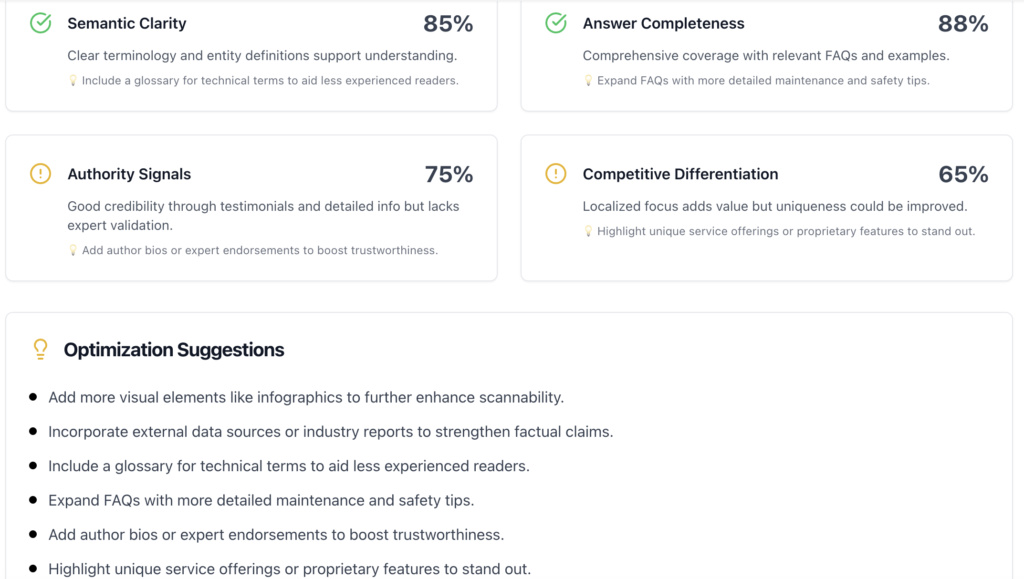
Even after all of the above, it’s worth running the finished article through a dedicated AI search content checker to catch anything you missed. We ran this exact article through Geoptie’s Geo Content Checker and got an overall GEO Optimization Score of 80%, labeled “Excellent content optimization.”

Geoptie content analysis results showing 80% GEO optimization score with Content Structure at 90% and Factual Density at 70%

Here’s the full breakdown across all six categories:

  • Content Structure, 90%. Strong structure with excellent readability and logical flow. Suggestion: add more visual elements like infographics to help scannability.
  • Factual Density, 70%. Moderate factual content with limited source attribution. Suggestion: bring in external data sources or industry reports to back up claims.
  • Semantic Clarity, 85%. Clear terminology and entity definitions support understanding. Suggestion: include a glossary for technical terms to help less experienced readers.
  • Answer Completeness, 88%. Comprehensive coverage with relevant FAQs and examples. Suggestion: expand the FAQs with more detailed maintenance and safety tips.
  • Authority Signals, 75%. Good credibility through testimonials and detailed info, but lacks expert validation. Suggestion: add author bios or expert endorsements to build trust.
  • Competitive Differentiation, 65%. Localized focus adds value, but uniqueness could be stronger. Suggestion: highlight unique service offerings or proprietary features to stand out.

Geoptie optimization suggestions list showing scores for semantic clarity, answer completeness, authority signals, and competitive differentiation

That kind of breakdown is genuinely useful because it tells you exactly which lever to pull next instead of guessing. Looking at our own scores honestly, Content Structure (90%) and Answer Completeness (88%) were our strongest areas, which lines up with how much attention we put into Steps 4 through 6 above. Our weakest area was Competitive Differentiation (65%), and that’s a fair callout. The article was originally written in a fairly generic “best practices” voice. Factual Density (70%) was the other soft spot. We leaned on our own process rather than citing outside studies or industry reports, and the checker correctly flagged that as something to fix.

Treat a score like this as a final polish pass, not a replacement for the writing itself. If your Authority Signals score is low, add an author bio. If Factual Density is weak, go find a stat or study to cite. If Competitive Differentiation is weak, like ours was, go back and make sure the article actually says something only your brand could say, rather than something any agency’s blog could have written.

Frequently Asked Questions About Ranking in AI Overview

How to rank #1 on Google search?

Consistently target keywords with clear search intent, structure your content so it directly and quickly answers the query, build relevant internal and external links, and keep improving the page based on real performance data in Search Console.

Structure your content in a clear, direct question-and-answer format, use FAQ and Article schema, and make sure your information is accurate, well-sourced, and easy for AI systems to pull out.

 Focus on clarity, structure, and factual accuracy. AI-driven results favor content that answers a question directly near the top of a section rather than content that buries the answer in long, unstructured paragraphs.

Do thorough keyword research, study what’s already ranking and being cited, write clearly structured content with strong FAQs, add schema markup, and make sure the page gets indexed quickly after publishing.

Final Thoughts

Ranking in AI Overview isn’t a different game from SEO. It’s the same fundamentals, keyword research, competitor analysis, solid content structure, schema, fast indexing, just held to a slightly higher standard of clarity and precision. Nail the research, write content that answers questions directly, mark it up properly, and get it indexed fast. Then run it through a checker to see what’s still missing. That’s the whole process. No shortcuts, no tricks, just doing the fundamentals properly.

No forms. No waiting. Just pick a time that works and we’ll talk.